2026 Complete Guide to Google Ads For Doctors SEO Outline

Doctor looking fior online digital marketing strategies

If you run a medical practice in the United States, your next patient is almost certainly searching Google right now. Studies show that 77% of American patients use search engines before booking a healthcare appointment, and more than 7 in 10 of those searches happen on mobile devices. Yet the majority of US doctors still run Google Ads without any structured SEO alignment, burning budget on clicks that never convert into booked appointments.

This is exactly the problem a Google Ads for doctors SEO outline solves. At Webtage, we have helped medical practices across the United States go from wasting thousands of dollars monthly on unfocused campaigns to generating consistent, high-quality patient bookings at dramatically lower cost per lead. 

This guide walks you through every component of that outline, backed by real US healthcare data.

What Is a Google Ads for Doctors SEO Outline?

A Google Ads for doctors SEO outline is a structured, integrated roadmap that aligns your paid search campaigns with your organic SEO strategy. Rather than treating Google Ads and SEO as two separate budgets competing for attention, this outline merges them into a single, compounding patient acquisition system.

It defines your keyword architecture, campaign structure, landing page requirements, conversion tracking setup, budget allocation, and local SEO foundation, all coordinated around one goal: bringing qualified patients to your practice at the lowest sustainable cost.

US Stat:  According to the CDC National Center for Health Statistics, over 8.5% of US adults searched the internet for health or medical information in the most recent reporting cycle. That translates to more than 28 million Americans actively looking for doctors online every year.

High-Intent Keyword Research for US Medical Markets

The foundation of any effective Google Ads for doctors SEO outline is precision keyword research. In the US healthcare market, the difference between a keyword that wastes money and one that books appointments often comes down to a single modifier word.

Focus your research on three keyword categories: transactional terms that signal booking intent, location-modified terms that confirm the patient is nearby, and specialty-specific terms tied to the conditions you treat.

High-Performing Keyword Examples for US Practices

  • Transactional intent: “cardiologist accepting new patients near me“, “same-day urgent care appointment [city]”
  • Location-modified: “best dermatologist in [city] NY”, “family doctor Chicago accepting insurance”
  • Condition-based: “knee pain specialist”, “ADHD doctor for adults”, “Type 2 diabetes management doctor”
  • Negative keywords to exclude immediately: free, jobs, symptoms, veterinary, DIY, home remedy, salary

Campaign Structure That Protects Your Budget

Poor campaign structure is the single biggest source of wasted spend in US doctor Google Ads accounts. When keywords from different specialties, intents, and geographies are lumped into one campaign, Quality Scores drop, CPCs rise, and reporting becomes meaningless. The solution is segmentation.

  • Campaign 1- Brand Defense: Bid on your own name and practice name to block competitors from stealing your branded traffic.
  • Campaign 2- Core Services: Specialty-level terms such as “orthopedic surgeon [city]” or “OB-GYN near me accepting new patients.”
  • Campaign 3- Condition & Symptom Terms: Patient-language searches like “chronic back pain doctor” or “high blood pressure specialist.”
  • Campaign 4- Performance Max: Retarget previous website visitors across Google’s display, YouTube, and Gmail networks.

Each campaign should contain tightly themed ad groups of no more than 10 to 15 keywords. This discipline lifts Quality Scores, which reduces CPC and improves ad position simultaneously, compounding savings over time.

Landing Pages That Convert Clicks Into Booked Appointments

Your landing page is where money is either made or lost. An ad for “knee surgeon Houston” that sends patients to a generic homepage will convert at roughly 2.2%. The same ad directed to a dedicated knee surgery page converts at 11.4% or higher. Message match between your ad and your landing page is everything.

US Healthcare Landing Page Checklist

  • One dedicated page per ad group: never send traffic to a homepage.
  • Headline must mirror the ad copy exactly for message match and Quality Score.
  • Display board certifications, US News rankings, and patient review star ratings prominently above the fold.
  • Booking form with three fields maximum: name, phone, and primary concern.
  • A prominent click-to-call button for the 40%+ of US healthcare conversions that happen by phone.
  • Mobile page speed under 3 seconds. Google’s own data shows 53% of US mobile users abandon pages that take longer.
  • HIPAA compliance notice on all forms that collect patient information.

Budget Planning and Smart Bidding for US Practices

How much should a US doctor spend on Google Ads? The right budget is determined by your specialty’s competitive intensity, your city’s market size, and the lifetime value of a new patient. Use the framework below as a starting baseline and scale based on performance data.

Practice Type Monthly Budget Target CPA Est. Bookings/Mo
Solo Physician $1,000 – $3,000 $25 – $45 25 – 50
Group Practice $5,000 – $15,000 $20 – $35 100 – 200
Multi-Specialty Clinic $15,000 – $30,000+ $15 – $28 300+

For bidding strategy, begin with Target CPA set at 75% of a single patient visit value. Once your account accumulates 50 or more monthly conversions, switch to Maximize Conversions to engage Google’s machine learning for automated optimization. US practices that make this switch report an average 23% reduction in cost-per-conversion within 90 days.

Local SEO for Doctors- The Organic Engine Behind Your Ads

Google Ads generate immediate visibility; local SEO builds the organic authority that progressively reduces your reliance on paid spend. For US doctors, 46% of all Google searches carry local intent, and the Google Maps pack appears above organic results for virtually every “doctor near me” search in the country.

Google Business Profile Optimization

A fully optimized Google Business Profile is the fastest free lever in local SEO for doctors. Profiles with complete information, recent photos, and consistent reviews appear in the top 3 of the local pack for high-intent searches, directly competing with and sometimes outperforming paid ads.

  • Select a precise primary category such as “Internist” or “Orthopedic Surgeon” and add two to three relevant secondary categories.
  • Maintain identical Name, Address, and Phone number across GBP, your website, Healthgrades, Zocdoc, and WebMD profiles.
  • Upload a minimum of 10 real photos of your clinic, staff, and waiting room. GBP profiles with 10 or more photos receive 42% more appointment direction requests on average.
  • Respond to every patient review within 48 hours. US patients read an average of 7 reviews before selecting a new doctor. (BrightLocal US Consumer Survey, 2025)
  • Add weekly posts covering new services, seasonal health tips, or updated office hours to signal an active, trustworthy profile.

Medical Schema Markup

Schema markup is structured data embedded in your website code that tells Google precisely who you are, what conditions you treat, and which physicians practice at your location. For US doctor websites, implementing MedicalOrganization, Physician, HealthcareService, and MedicalSpecialty schema types improves entity recognition in local search, AI-generated overviews, and rich result features, all without additional advertising spend.

Conversion Tracking- Measure Every Patient Touchpoint

If you are not tracking conversions accurately, you are optimizing blindly. US healthcare practices must capture phone calls, form submissions, live chat interactions, and offline appointment completions as distinct conversion events tied back to specific campaigns and keywords.

  • Google Tag Manager: Track form completions, scroll depth, CTA clicks, and call extension taps across all pages.
  • Call tracking via CallRail or a similar service: Assign unique forwarding numbers to each campaign. Phone calls account for 38% to 42% of all US healthcare conversions.
  • Offline conversion imports: Connect completed appointments from your EHR or practice management software back to the Google Ads clicks that generated them.
  • Enhanced conversions with GCLID parameters: Essential for cross-device accuracy in a market where 60% of users research on mobile and book on desktop.

5 Google Ads Mistakes US Doctors Must Stop Making Today

  • Wastes 30% to 40% of your budget on irrelevant searches. Always pair broad matches with a negative keyword list of 100 or more terms. Broad match without negatives:
  • A Dallas clinic showing ads to users in Fort Worth or beyond bleeds budget fast. Use a 10 to 15-mile radius with explicit location exclusions. No geographic fencing:
  • Homepages convert at 2.2% on average. Dedicated landing pages convert at 11.4% or more. Every ad group deserves its own page. Sending all traffic to the homepage:
  • Call extensions, sitelinks, and structured snippets increase CTR by up to 15% at zero additional cost. Adding trust phrases such as “Board Certified” and “Accepting New Patients” lifts performance immediately. Ignoring ad extensions:
  • Collecting Protected Health Information in forms without compliant consent flows risks both Google Ads account suspension and regulatory penalties under federal HIPAA law. HIPAA non-compliance in tracking:

What This Outline Delivers: Real Results from US Practices

When this outline is executed in full, the performance shift is significant and measurable. One US multi-specialty practice came to Webtage spending $8,000 per month on Google Ads with no SEO alignment, generating 12 patient leads at a cost-per-lead of $666. Within 60 days of implementing this structured outline, including campaign restructuring, dedicated landing pages, local SEO, and proper conversion tracking, the same $8,000 budget produced 120 or more patient leads at just $6.91 per lead.

That 93% reduction in cost-per-lead was not the result of a bigger budget. It was the result of structural discipline: the right keywords, the right campaign architecture, the right landing pages, and organic SEO working in concert with paid ads.

Conclusion: Build Your Patient Pipeline the Right Way

The US healthcare advertising market is growing more competitive every year. Statista projects total US healthcare digital ad spend will surpass $20 billion by 2027. Practices that integrate Google Ads with a strong SEO foundation today will build compounding search authority that becomes progressively harder for competitors to challenge.

A properly executed Google Ads for doctors SEO outline is not a one-time project. It is an ongoing system of keyword research, campaign optimization, landing page testing, local SEO maintenance, and conversion tracking refinement that improves with every passing month.

At Webtage, we specialize in building exactly these systems for US medical practices of every size and specialty. Whether you are a solo practitioner in a midsize US city or a multi-location specialty group competing in a major metro market, this outline is your roadmap to sustainable, scalable patient acquisition growth.

Ready to grow your practice? Contact Webtage today for a free Medical Google Ads and SEO audit tailored to your specialty and market. 

Exploring Pros & Cons of Geofencing vs Google Ads Geotargeting? Here’s How the Two Compared For Us

Geofencing vs Google Ads Geotargeting

As technologies powering location-based ad targeting become more advanced, marketers are looking at geofencing ad platforms as a way to complement or even substitute traditional digital ad platforms, such as Google Ads.

While both geofencing platforms and traditional paid media channels offer location-aware marketing options, they differ in levels of granularity, the layering of audience targeting, the technologies that drive the two platforms and results they can produce.

Based on our firsthand experience running campaigns on both platforms, this blog will walk through a detailed comparison and the results we achieved.


Geofencing vs Geotargeting –


Semantics matter, especially in the marketing world, where words can mean completely different things in terms of what’s truly being offered, its value, and what to expect from the offer. To make sure we are on the same page, let’s define geofencing and how it is different from geotargeting—as these two terms are often used interchangeably.

Geofencing involves the creation of a virtual boundary, i.e., a “fence” around a specific geographic area using GPS, RFID, Wi-Fi, or cellular data and then targeting individuals based on their visitation to these geofenced locations. Some common targeting options includes:

  • Capability to display an ad when a device enters or exits this boundary, aka on-premise targeting 
  • Capability to target users (via their mobile devices) that have previously visited a geofenced location 
  • Capability to target neighborhoods that show high visitation frequency to a particular store or location, aka neighborhood targeting 
  • Finally, geofencing platforms can also provide geotargeting, which simply means delivering ads to people in a certain zipcode, city, state of country, irrespective of whether they have entered or exited a fence.

In that sense, geofencing ad platforms offer geotargeting options but go beyond to also offer a broader range of location-based geofenced targeting.

For the sake of this article, I will be focusing on Ground Truth, a geofencing ads platform that I have experience in and compare it to Google Ads, a traditional paid media channel.

Let’s start by understanding differences in technologies, audience targeting (beyond location parameters) and cost structure. Then we will dive into performances and end with platform recommendations.


Technologies, Audiences & Cost


Technologies Powering Ad Targeting – 

Ground Truth employs proprietary “Blueprints” technology to create polygon mapping of  physical spaces with high accuracy, allowing for multi-level geofencing: in-store, on-lot, and retail area. This permits advertisers to target physical locations with accuracy. 

How granular can you go once you’ve drawn a polygon fence? Well you can laser target with a minimum of 0.1 mile or 528 feet around a geocode. This level of granularity is what allows you to choose if you want to target people in-store, on-lot, or even the parking lot. 

This is a big deal! Imagine if you are a coffee shop and you want to attract coffee drinkers who are in the parking lot of a competitor coffee shop. You can offer them discounts and incentivize them to come to your coffee shop instead!

Google Ads, on the other hand, offers geotargeting largely through radius targeting and existing geographic locations like cities or zip codes. Capable of wide targeting, it is less intensely targeted than GroundTruth’s POI-level mapping.

Winner: Ground Truth as it offers very granular targeting of geofenced locations in addition to geotargeting options.


Layering in Audience Targeting –


Ground Truth offers improved audience targeting by layering in location targeting along 

behavioral audiences that combine visitation patterns with demographic data to create segments like “Luxury Shoppers” or “Fast Food Diners.” The platform also allows for custom segments based on individual campaign goals.

Bear in mind that Ground Truth does not permit targeting of sensitive audience segments including targeting based on health, race, religion, sexual orientation, political beliefs etc.

One notable difference between the two platforms is in the permissiveness or openness of each platform toward targeting audiences. Google Ads offers more relaxed audience layering, such as on the basis of inferred interests and tendencies that tend to coincide with sensitive subjects such as health conditions, political beliefs, or cultural membership — although these are not labeled as such. We presume this is because Google Ads relies heavily on machine learning and cross-channel signals to classify interests — not direct self-identification. In contrast, Ground Truth relies completely on visitation data that are subject to stricter privacy controls around mobile location signals.

Winner: Google as they have billions of real-time intent signals through their proprietary systems. This combined with probabilistic modeling provides Google with unparalleled audience data.


Cost Structure:


Ground Truth offers two bid types, cost per click (CPC) and cost per mile (CPM, which translates into cost per thousand impressions) with two optimization strategies: maximize delivery & maximize clicks. 

In terms of bid type, they suggest a minimum CPM of $3.5, but for short-flight campaigns or event-based campaigns, they suggest a CPM of $10-15. For video campaigns, the minimum CPM is $8 and for OTT & CTV platforms, the minimum spend is $25 and for streaming audio ads (say, on a podcast), the minimum spend if $19.

Google bid types also include CPC and CPM, but their optimization options are broader and include not just delivery or click optimization, but conversion, conversion value and target return on ad spend (tROAS) optimizations as well.

Winner: Google. The reason why Google wins this round is because of their conversion and revenue optimization focus that leads to better conversions and revenue generation.


Media Type:


Ground Truth offers a much wider range of devices to display their ads, including web (web & app), desktops, Connected TVs (CTVs that refer to devices that can connect to the internet and stream digital content, like smart TVs, gaming consoles, and streaming sticks, like Roku, Fire & Stick), Audio streaming, and OTT platforms.

Google Ads, also offers the ability to render ads on search, display, Gmail, video channels like YouTube, Discover & Maps, they do not offer the wider range of media types that Ground Truth offers. 

Note: Google also offers CTV, OTT & audio streaming ads through its separate DV360 platform. For our comparison purposes, we are limiting our analysis to the Google Ads platform only.

Winner: Ground Truth. The wide media type choice makes Ground truth the winner here. The caveat being that Google also offers wider media types but you would have to use its DV 360 ad platform to expand your media type options.


How Did the Two Compare in Terms of Performance?


We recently ran campaigns to drive foot traffic to our client’s thrift stores and here is the performance snapshot

Impressions & Clicks: Ground Truth drove 4,819 clicks on 335,000 impression compared to 1,920 clicks on 311,941 impressions on Google for a comparable budget.

Store Visits: Google easily took the prize here with 183 store visits compared to ~15 visits generated by Ground Truth.

The vastly superior campaign performance on Google needs to be taken in with a grain of salt.

While both campaigns had similar budgets, the wide difference in attributed store visits likely reflects methodology differences in tracking versus campaign performance. 

Google Ads has the benefit of vast device coverage and probabilistic modeling based on user behavior across Google services. GroundTruth, by contrast, uses stricter location-based criteria, which can result in fewer — but potentially more accurate — visit attributions.

Let’s discuss these one-by-one:

Vast number of Real-time signals – Google capitalizes on its own vast network of Android OS users whose location history is turned on by default. It also uses a combination of GPS, Wi-Fi, and Google Maps data from users logged into their Google accounts. Ground truth, in contrast, uses mobile location signals gathered from SDKs within 3rd-party apps and often requires opt-in location permissions via those apps.

Strict Visits vs Inferred Visits – To further hone in on the difference in performance, Google Ads visitation criteria is modeled and inferred, whereas Ground Truth visits are more conservative, but high confidence. 

As a result of the difference in attribution models, Google may attribute more visits — even if some are probabilistic — because of its expansive data and modeling.

Attribution Window –  Google is likely to apply a longer attribution window (e.g., 30 days post-click or post-view). Ground Truth is likely to apply shorter attribution windows and more restrictive visit validation rules (e.g., 7-day window, presence verification).

Such differences in timeframe and underlying logic can significantly affect visit counts.


Conclusion


Both platforms offer highly advanced location-based targeting to help you reach your objectives. The right choice ultimately depends on your campaign goals, budget flexibility, and how precisely you want to target or measure results.

If you seek to gain most from laser-targeting individuals within physical boundaries of a location— like a competitor’s storefront or an event venue, — geofencing is the way to go. The location granularity and precision of geofencing platforms make it an easy win. 

If you want to layer in rich behavioral data, such as audience interests, affinity, or intent to make a purchase, both platforms offer some very solid and relevant choices, but Google Ads offers broader audience reach and greater flexibility in terms of sensitive interests. 

Finally, if you are interested in running conversion- or revenue-driven campaigns. Google’s massive data ecosystem and superior attribution modeling also give it an edge for optimizing performance at scale.

In conclusion, the most effective strategy may not be choosing one over the other — but testing both. Blending geofencing’s spatial accuracy with Google’s audience intelligence will unlock powerful synergies that allow you to reach the right people, at the right location, with the right message.

Looking to explore the best marketing mix for your business? Contact Webtage, a results-driven digital advertising agency recognized for excellence and repeatedly exceeding client expectations with 6x–10x campaign ROI.

Seven Best Practices for B2B Lead Generation Campaigns in 2025

A key B2B marketing goal is to generate a pipeline of qualified leads that can then be handed over to sales to be followed upon. Other marketing goals are brand awareness & reputation building, customer upsell & cross sell, and building brand advocates – this completes the lifecycle revenue marketing model. More on this later.

As a B2B Advertising Agency in Chicago, our B2B lead generation is usually done through a two-pronged strategy: an inbound, content-led strategy or an B2B outbound search or social media advertising, including account-based campaigns. This article will focus on one such outbound strategy: Google Search Ads.

The Power of B2B Lead Generation with Proven Google Ads Strategies

Google Ads is an excellent outbound strategy that works well to drive sales qualified traffic, assuming you have a well-positioned & credible brand and a clear set of solutions that you can either demo or provide a quote for (the two scenarios will dictate the clear call to action in your Google Ads). 

Let’s start with the well established best practices of B2B lead generation through Google Ads

Create Your B2B Lead Generation Google Ads Strategy

B2B sales cycles are long, ranging from an average of 2 months to 6 months & more. B2B buyers go through stages of awareness, consideration and decision making. Google Ads can work well to target buyers when they are still in their awareness stage. Marketing can target buyers through advertising content-led informative pieces such as white papers and industry trend write-ups. Marketing qualified leads (MQLs) who consume top-of-the-funnel content pieces can then be nurtured deeper into the funnel through marketing automation and drip marketing.

However, for sales qualified lead generation, it is best to target mid-funnel and bottom-funnel buyers who are actively looking for solutions and are in the process of shortlisting candidates for their final decision making. This is the sweet spot that you can target via Google Ads.

You can create clear calls to action to drive demo, consultations or requests for quotes.

Identify Your Ideal B2B Customer with Precise Targeting

Before you look into targeting on Google Ads platform, you should create buyer profiles. In order to do so, list your customers characteristics , including geographies you are targeting, their things they like (interests), things they value (value system), job profiles (targeted job titles, industries, company revenue range etc.), and demographics (age, sex, marital status, presence of children, etc.).

Based on your buyer profile, you can now set targeting options on Google Ads. Google Ads allow for rich targeting options, including locations, audience targeting via inbuilt Google Segments (such as affinity or in-market audiences) or search-term intent segments. You can also upload customer lists or create retargeting lists based on criteria you set and develop similar audience segments to make your targeting laser sharp (more on this later).

Assuming you have identified the best keywords for your campaigns, define your campaigns and ad groups strategically aligned with your business goals. Remember, similar solutions or products typically should be placed under one campaign unless you want to allocate different budgets or goals (for instance, Solution A advertised in two different locations), in which case you may want to create separate campaigns for each location. Once you create campaigns, you can use ad groups within each campaign with common themes or targets to control bid strategies, placements, audience targeting etc.

Do Your Keyword Research & Add Negative Keywords Diligently

Just like identifying ‘high-traction’ keywords that signal commercial or transactional intent for SEO, B2B Google ad campaigns’ success also rests on identifying mid-funnel commercial or transactional keywords. If you are targeting top funnel audiences, you may also decide to include informational- or educational-intent keywords.

Google ads allow for broad match keywords, phrase match keywords or exact-match keywords. When starting with a brand new ad campaign, it may be worthwhile to start with broad match campaigns if you want to cast a wider net. As you collect more data on search keywords, you may want to switch to or add phrase match keywords. Remember, you may want phrase match or exact match keywords to increase the probability of a good match but the volume for those keywords may be low or the cost per click may be higher.

B2B lead generation via Google Ads requires very tight monitoring of keywords in the initial phases to ensure you are neither paying for irrelevant clicks nor do you want to pay exorbitant prices for keywords that spiral your ad budget out of control.

We find adding negative keywords is an especially important step, especially if you’re starting out with broad match keywords. Mixing in broad match keywords with phrase match or even exact match keywords over time is a great strategy that brings in the greatest ROI as that casts the widest net but also builds high-intent keywords through phrase and exact match. However, regular monitoring is a must anytime you work with broad match keywords.

Crafting Irresistible B2B Ad Copy, Offers & Landing Pages

As a B2B marketer, you know the importance of standing out in a crowded landscape. Your ad copy and offers need to be compelling enough to capture the attention of your target audience and inspire them to take action. But how do you achieve that?

The key lies in understanding your buyers’ pain points and crafting a value proposition that speaks directly to their needs. Your ad copy should clearly communicate the unique benefits of your product or service, while your offers should provide tangible value that your prospects can’t resist.

Whether it’s an informative lead magnet, a limited-time discount, or a free consultation, your B2B offers must be tailored to your audience and designed to drive conversions. By focusing on the specific challenges your buyers face and how your solutions can solve them, you can create ad copy and offers that are truly irresistible.

Add Ad Assets

Are you looking for an easy way to improve your Adwords performance? We highly encourage you to consider ad extensions to improve your ad performance. Ad assets (previously known as extensions) are hyperlinks you see below the main text ad. Having visible and relevant hyperlinks along with the main ad is likely to increase your click-through-rate (CTR).

Amongst the ad assets we recommend for B2B lead generation ads are:

  1. Sitelink – Sitelink ad extensions are hyperlinks that are deep linked to relevant pages on your website. You could consider adding sitelink extensions to your product/service specific landing pages, for example.
  2. Callout – Callout extensions allow you to display additional text along with your ad that highlights what makes your business unique. Note that callouts are set up at the account level and are not clickable.
  3. Call – This is a must for your on-the-go mobile audience! By enabling the call extension, you are allowing users to simply click on your phone number displayed in the ad, reducing the number of clicks required for conversion.
  4. Price – If you offer competitive pricing, you may want to use price extensions to display those under your ads for differentiation and improved conversions.
  5. Promo – If you are running promotions or discounts, you may want to use these extensions to highlight them in your ads. You can select dates to show these extensions and use either flat rate or percentage discounts.
  6. Lead Form – Lead forms are especially useful for B2B lead generation as they eliminate the need for a click to your landing pages. Users can provide required information directly through Google Ads.

There are other ad assets provided by Google Ads, such as location, seller ratings, app, image, affiliate locations and structured snippet assets that can also use, if they make sense for your business.

Optimizing Your B2B Google Ads Bidding for Maximum Conversions

Now that you’ve created your ad strategy, defined your buyer profiles, researched and refined your high traction keywords and created outstanding ad, offers and landing pages,the next step is to define your bidding strategy.

Most B2B lead generation campaigns benefit from maximize conversion, maximize conversion value, or Target Return on Ad Spend (tROAS) bidding strategies. 

A word of caution here – do not set a maximize cost per click (CPC), a maximize cost per acquisition (CPA) or a target ROAS percentage without collecting 6-12 weeks of data. We have seen that low CPCs, in an attempt to control ad budgets, can generate low-quality leads. Similarly setting very low cost per acquisition can also skew the results towards low-quality B2B leads.


Leverage Retargeting Ads to Nurture B2B Leads

It’s a well-known marketing rule that a prospect needs at least seven touch points before they will consider your call to action and act upon it. For B2B sales, you may require even more touch points than that. In addition, there may be multiple decision makers that you need to convince in  order to drive a consideration or a sale.

This is where retargeting platforms come in handy. Consider setting up retargeting lists of website visitors who have exhibited an interest in your services or product on Google Ads, LinkedIn or even Facebook / Instagram.

You can target not only the visitors to your website through more personalized ads on other platforms, but you can also build a lookalike audience segment and target similar profiles through targeted ads. 

The multiple touchpoints will only strengthen your chances of being considered as a vendor for the solutions your prospects are looking for.

Conclusion: Dominate Your B2B Market with the Power of Google Ads

If you’re serious about growing your B2B business, you can’t afford to ignore the power of Google Ads. By leveraging the unparalleled reach and targeting capabilities of this platform, you’ll be able to connect with your ideal customers at the exact moment they’re searching for your products or services.

Crafting a high-performing B2B Google Ads strategy requires a deep understanding of your target audience, their pain points, and the buyer’s journey. But when executed correctly, it can deliver a consistent flow of qualified leads and skyrocket your revenue.

You can use other social media ad platforms complimentary to Google Ads to run retargeting campaigns. However, Google Ads is one of the most powerful outbound campaign platform that we have seen in driving sales qualified B2B leads, if executed well.  

Dominate your industry and reach new heights of success with the help of this proven digital marketing powerhouse.

Contact Webtage, a premiere B2B brand and performance marketing agency in Chicagoland to discuss your B2B sales pipeline generation needs.


40 Questions to Ask Before You Start Healthcare Digital Marketing

A digital marketing campaign needs a strategic approach and careful planning. Advance preparation can help both clients and vendors develop a common understanding of marketing objectives & constraints.

This questionnaire will help you understand your vision for your organization’s growth goals and plan the overall effort required for a confusion- and conflict-free digital campaign. It will help your vendor understand your constraints and will also lower your risk for running into a time and cost overrun.

So whether you are considering improvements to your existing campaign or planning an extensive omnichannel marketing launch, use this questionnaire to start your digital strategy on the right footing and build a successful healthcare website that effectively supports your healthcare marketing goals..

    What is Refresh icon

    5 × one =

    About the Author

    A believer in hype-free and performance driven digital strategies, Snigdha’s endeavor is to get your brand established and your business grow. She is passionate about research, design and analytics and works non-stop and meticulously to make sure that your brand stands out from the rest.

    Snigdha’s background is in research design, industry research, content creation, and qualitative and quantitative research (including web-based and phone survey methods and focus group discussions). She is a highly qualified professional in the areas of digital marketing strategy design, SEO, content creation, and social media marketing. Most recently she has grown a client’s online presence from zero to 25% online leads within 3-6 months; moved client website to the #1 & #2 spots on Google, Bing, and Yahoo for all major keywords; and generated online leads accounting for 25% – 30% of all leads for that client.

    Contact her at snigdha@webtage.com

    8 Easy Ad Extensions to Improve Adwords Conversions!

    Are you looking for an easy way to improve your Adwords performance? We highly encourage you to consider ad extensions to improve your ad performance.

    Ad extensions are hyperlinks you see below the main text ad. Having visible and relevant hyperlinks along with the main ad is likely to increase your click-through-rate (CTR).

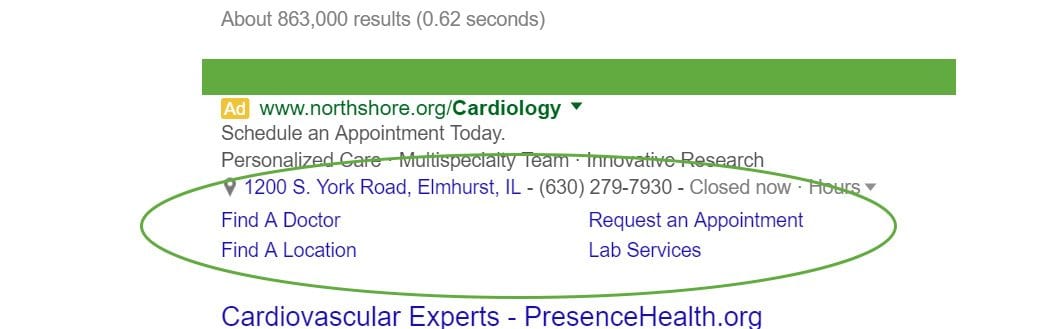
    In the example below, the use of locations extensions to highlight physical address of the center, sitelink extension to deep link  actionable webpages, and call extension to allow mobile users to call the health clinic can all work to improve click-through-rate of the ad.

    Ad extensions can be your best friends in improving conversion rates. But why do ad extensions work?

    1. They increase your real estate. Google search ads allow a measly 25 characters for the headline, an additional 35 characters for the 1st ad text line and another 35 characters for the 2nd text line. Combine this with the requirement that your ad needs to pack a punch and stand apart from competition. How do you do all of this in mere 95 characters? Ad extensions to the rescue! Ad extensions allow you to add more information to your ad and increase your real estate in the search ad block of search engines. More text, more links and more space allocated to your ad can result in higher click-through-rate and higher conversions.
    1. They highlight your unique selling points – Callout extensions, sitelink extensions and structured snippet extensions can allow you to draw attention to your unique strengths, provide hyperlinks to relevant webpages and highlight particular service, product or your business itself.
    1. They enable deep links – Sitelink extensions are an easy tool to provide deep links to your website beyond your landing page. These sitelinks can easily drive traffic directly to book and appointment page, testimonials page, locations page or any other goal-specific page.
    1. They highlight your location – If you are a local business and want to tell your prospects that help is right around the corner, what better way to do it than add a locations extension?
    1. They allow mobile users to call you – Use call extensions to allow mobile users to call you directly by tapping on your phone number. Easy reach equals faster conversions.


    How We Used Ad Extensions to Increase Conversions for a Dental Clinic

    While running an ad campaign for a dental clinic we significantly improved conversions after enabling ad extensions. For instance, ads with the location extension enabled achieved a 29.82% conversion rate. Location extensions work really well for businesses with a storefront or a local service radius because it signals to prospects that help is nearby.

    The biggest impact on conversion rate was for ads with the Call extension enabled had a 38.10% conversion rate!

    Sitelink extension also worked really well for our clients when we used it to promote a Valentine’s Day Teeth Whitening Special. Result? A 26.67% conversion rate for the month.


    So what ad extensions are available for businesses to tap into?

    Google Adwords allow for the following extensions:

    1. Sitelink extensions – Sitelink ad extensions are hyperlinks that are deep linked to relevant pages on your website. In the example above, “Find a Doctor,” “Find a Location,” “Request an Appointment” and “Lab Services” are all sitelinks that improve the chances of your ad being clicked.
    2. Location extensions – Adding an address of your physical “storefront” can also increase clicks for your search audience that is shopping locally. Location extension signals to your audience that help is right around the corner.
    3. Call extensions – This is a must for your on-the-go mobile audience! By enabling the call extension, you are allowing users to simply click on your phone number displayed in the ad, reducing the number of clicks required for conversion.
    4. App extension – Are you looking to increase visibility and downloads of your app? Add app extensions to drive traffic to your download page.
    5. Review Extension – What better way to increase trust in your audience than to provide a positive review from a third-party review source? Review extensions allow you to do just that!
    6. Callout Extensions – Callout extensions allow you to display additional text along with your ad that highlights what makes your business unique. Note that callouts are set up at the account level and are not clickable. In the ad example above, the callouts for the cardiovascular center incude “Personalized care,” “Multispecialty team” and “Innovative Research” – all excellent USPs for the healthcare center.
    7. Structured Snippet Extensions – Similar to callout extensions, structured snippet extensions allow you to highlight a specific product or service under predefined headers, such as Amenities, Brands, Neighborhoods, Service Catalog, Styles, Types and more.
    8. Automated Extensions Report – Originally known as “annotations” that displayed consumer ratings and seller ratings, automated extensions are set up automatically to display ratings, social extensions, dynamic structured snippets and dynamic sitelinks if your ad meets certain criteria.

    Looking for ways to improve your Ad Campaign Performance? Contact us today for a 24-hour turnaround Adwords Audit!